See your whole day
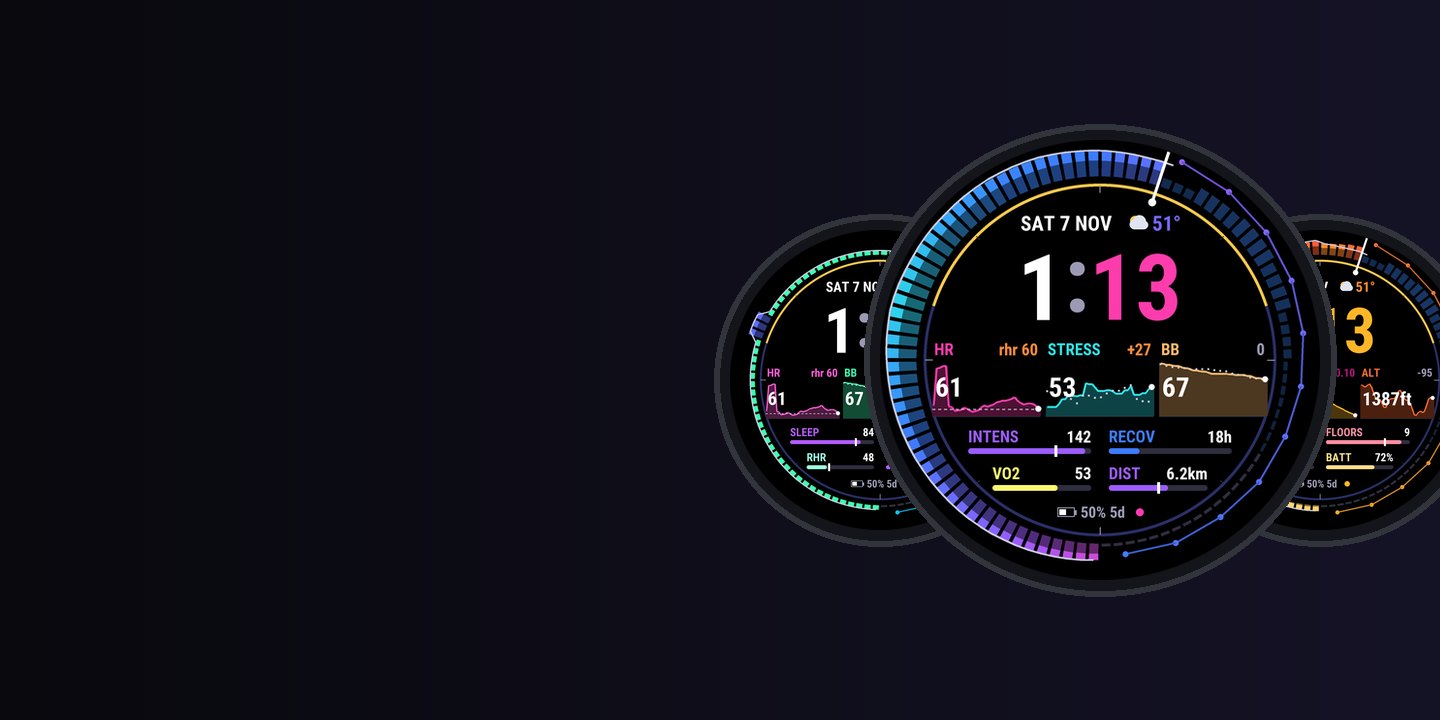
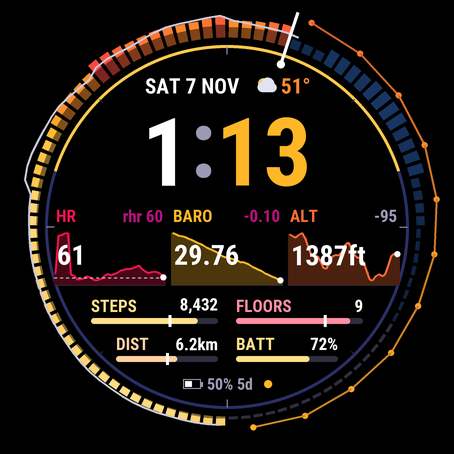
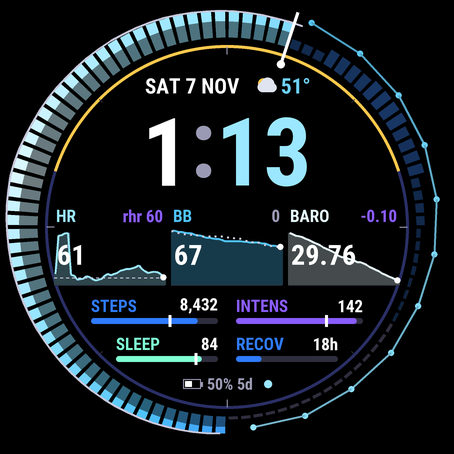
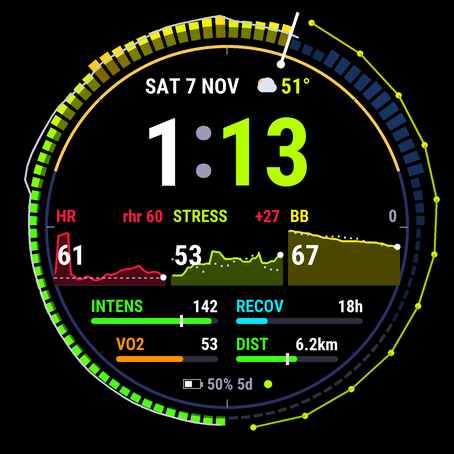
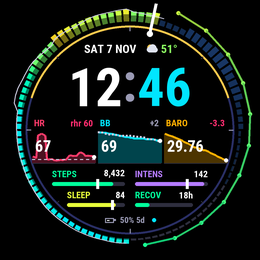
The day ring puts the last 24 hours of stress, Body Battery or heart rate around the bezel, with your normal day traced over it and the forecast for the rest of today.
Garmin Connect IQ watch face · 67 watches
Your day vs your normal.
Numbers without context are just numbers. Baseline learns your typical day and shows, on every metric, how today compares: a 24-hour day ring of your body, three six-hour sparklines and goal bars that know where your normal day would be by now.
by falkster · one-time purchase, no subscription
What it is
Most data faces pile on numbers. Baseline adds the one thing they leave out: your own normal. It learns your typical day as it runs, then colours every metric by how today compares.
The day ring puts the last 24 hours of stress, Body Battery or heart rate around the bezel, with your normal day traced over it and the forecast for the rest of today.
Three six-hour charts with the value now and how far it is from your normal for this time of day.
Goal bars with a tick where your normal day would be by now. Behind the tick at 3 pm? Take the stairs.
Why it matters
A resting heart rate of 54 is great for one person and a warning for another. Stress of 40 at 10 am may be your normal Monday. Baseline answers the question every data nerd asks: is this normal for me?
vs you
Body Battery and stress are compared with your own typical value for this time of day, learned from the days the face has seen.
3 charts
Most data faces show one chart at most. Baseline shows three six-hour sparklines and a 24-hour ring at once.
by now
Goals are daily, your day isn’t over. The tick on each bar shows where your normal day would be at this hour.
5%
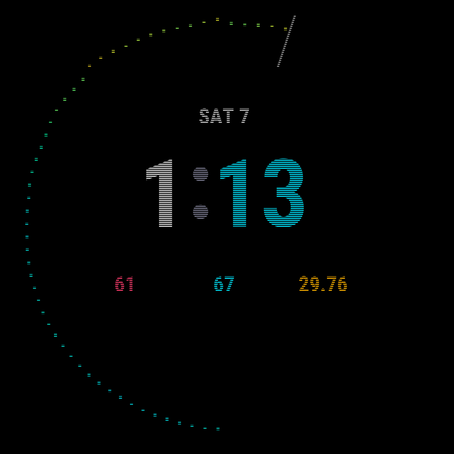
A real always-on view for AMOLED: the whole day ring as dots, within Garmin’s burn-in rules, instead of just the time.
Features
Big digits, one colour code across the face, and every metric a touch away from its Garmin widget.
How to read it
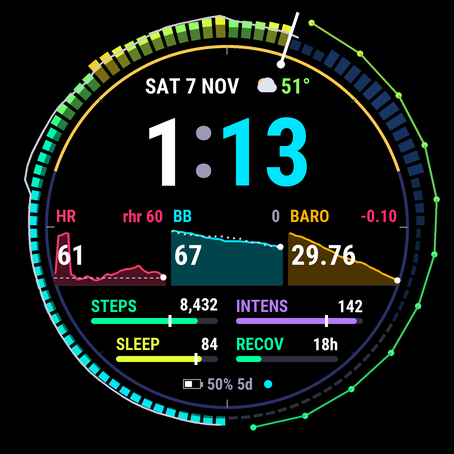
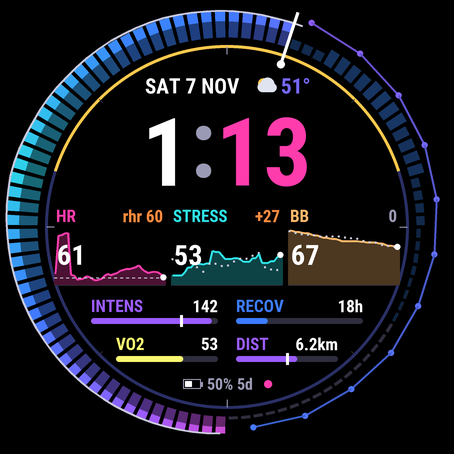
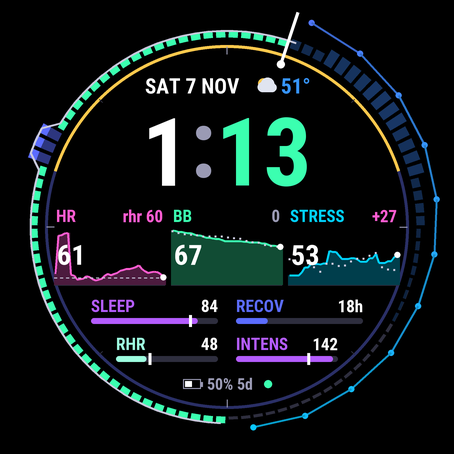
Below the time: three tiles (label and “vs normal” on top, value over a six-hour chart, dotted line for your normal) and four bars (fill to goal, white tick for your normal by now).
Screenshots
Setup
Get Baseline (or Baseline Lite) from the Connect IQ Store app on your phone and send it to your watch.
On the watch, hold the button or screen on the watch face, choose Watch Face, scroll to Baseline and select it. Menu names vary a little by watch.
Baseline: in the watch face’s Customize menu, or in Connect IQ on your phone (Baseline › Settings), apply All-rounder, Runner, Recovery or Outdoor, then a theme.
Wear it. After a day the contour and the “vs normal” numbers appear; after a week they settle. Bars use Garmin’s own history from the start.
Tip. Keep Baseline as your face while you get used to it: it learns only while it’s the active face, and fills gaps from Garmin’s sensor history when you come back.
Every setting, the presets and how each number is worked out are in the guide.
Baseline or Lite
| Baseline Lite | Baseline | |
|---|---|---|
| Day ring with your normal and the forecast | ✓ | ✓ |
| Spark tiles and goal bars with the normal tick | ✓ | ✓ |
| AMOLED always-on view | ✓ | ✓ |
| Colour themes | Neon | 6 |
| Ring metric | Stress | Stress, Body Battery or heart rate |
| Tiles and bars | Default layout | Any of 6 tiles and 10 bars |
| Presets | – | All-rounder, Runner, Recovery, Outdoor |
| Settings on the watch and in the app | – | ✓ |
| Seconds when awake | – | ✓ |
| Price | Free | $1.99 once |
Devices
Connect IQ 4.2 or later. The Connect IQ Store page lists every supported model.
165, 165 Music, 170, 170 Music, 255, 255 Music, 255S, 255S Music, 265, 265S, 570 (42 and 47 mm), 70, 955, 965, 970.
fenix 7, 7S, 7X and their Pro and Solar editions, fenix 8 (all sizes, AMOLED and Solar, Pro), fenix 9 and 9 Pro, fenix E, epix (Gen 2), epix Pro (42, 47, 51 mm), Enduro 3 and 4.
Venu 3, 3S, Venu 4 (41 and 45 mm), Venu X1, vivoactive 5 and 6, Instinct 3 AMOLED (45 and 50 mm), Instinct Crossover AMOLED.
MARQ (Gen 2), MARQ Aviator, MARQ (Gen 3), D2 Mach 1 and 2 (and Pro), Descent G2 and Mk3, Approach S50, S70 and S72.
Privacy
Baseline has no internet permission, no account and no server. It can’t send anything anywhere.
Today’s 15-minute values, your learned normal and the last seven sleep scores are kept on the watch, nowhere else.
It reads what Garmin offers watch faces: sensor history, activity totals, your profile, complications and weather. Privacy policy.
FAQ
Lite is free and shows the same face in the Neon theme with the default layout: the stress ring; HR, Body Battery and pressure tiles; steps, intensity, sleep and recovery bars; and the always-on mode. Baseline ($1.99) adds the six themes, the choice of ring metric, every tile and bar option, the four presets, seconds and settings on the watch itself.
Baseline learns your normal as it runs. The light contour (your typical day) and the “vs normal” numbers fill in after the face has seen a day, and get steadier over the first week. Until then the tiles show the trend per hour instead.
No. Garmin doesn't let watch faces read them. Baseline shows every relevant metric Garmin does make available, including the sleep score on watches with Connect IQ 6.0.2 or later.
Baseline does its heavy work once every few minutes and draws simple shapes, with no network and no background process. The always-on mode lights about 5% of the screen.
A bar needs Garmin data and, for its tick, a few days of history. Sleep score needs Connect IQ 6.0.2+; floors need a barometric altimeter; VO2 max needs a recorded run or ride.
Yes, on touch watches: touch and hold a tile, a bar, the weather or the ring to open the matching Garmin widget.
No. Baseline has no internet permission, no account and no server. Everything it learns stays on your watch.
Baseline is $1.99 once; Baseline Lite is free. Garmin's Connect IQ Store handles payment and refunds.